The landscape of professional computing in Nigeria has shifted. As laptops like the MacBook Air, Dell XPS, and HP Spectre become thinner and more powerful, manufacturers have sacrificed the traditional, bulky HDMI port to achieve a sleek profile.
However, the reality in Lagos boardrooms, Abuja conference centers, and university lecture halls across Nigeria remains the same: the projector or TV waiting for you likely requires an HDMI cable connection.
If you’ve ever walked into a high-stakes presentation only to realize your laptop has nothing but tiny USB-C ports, this guide is for you. At Kara.com.ng, we don’t just sell the best laptops; we ensure you stay connected. Here is everything you need to know about navigating the “No HDMI” era.
Table of Contents
Understanding the Shift: HDMI Full Meaning and Evolution
Before we dive into the solutions, let’s address the basics. HDMI full meaning is High-Definition Multimedia Interface. It is the industry standard for transmitting uncompressed video data and compressed or uncompressed digital audio data from an HDMI-compliant source device to a compatible computer monitor, video projector, or digital television.
In the Nigerian market, you will encounter various versions:
- HDMI 2.1: The latest standard, supporting HDMI 4K cable performance at 120Hz or even 8K. This is essential for gamers and high-end video editors.
- HDMI 1.4/2.0: Found in most standard office projectors and older TVs.
The Primary Solution: HDMI Adapter for Laptop and Type-C Conversions
If your laptop only has USB-C ports, your first line of defense is a high-quality HDMI adapter.
HDMI to Type C Cable vs. HDMI Adapter
- HDMI to Type C Cable: This is a single cord with a USB-C plug on one end and an HDMI plug on the other. It’s perfect for home setups where you connect the same laptop to the same TV every day.
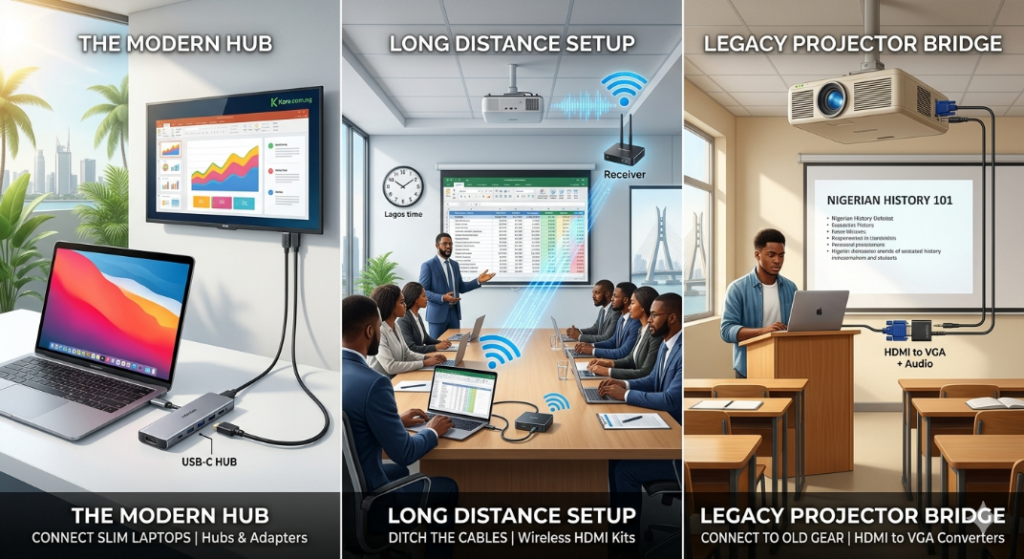
- HDMI Adapter for Laptop: Often called a “dongle,” this is a small device that plugs into your USB-C port and provides a female HDMI port. This is better for professionals because it lets you use the HDMI cable from the TV already provided in the meeting room.
The “HDMI Hub” Advantage
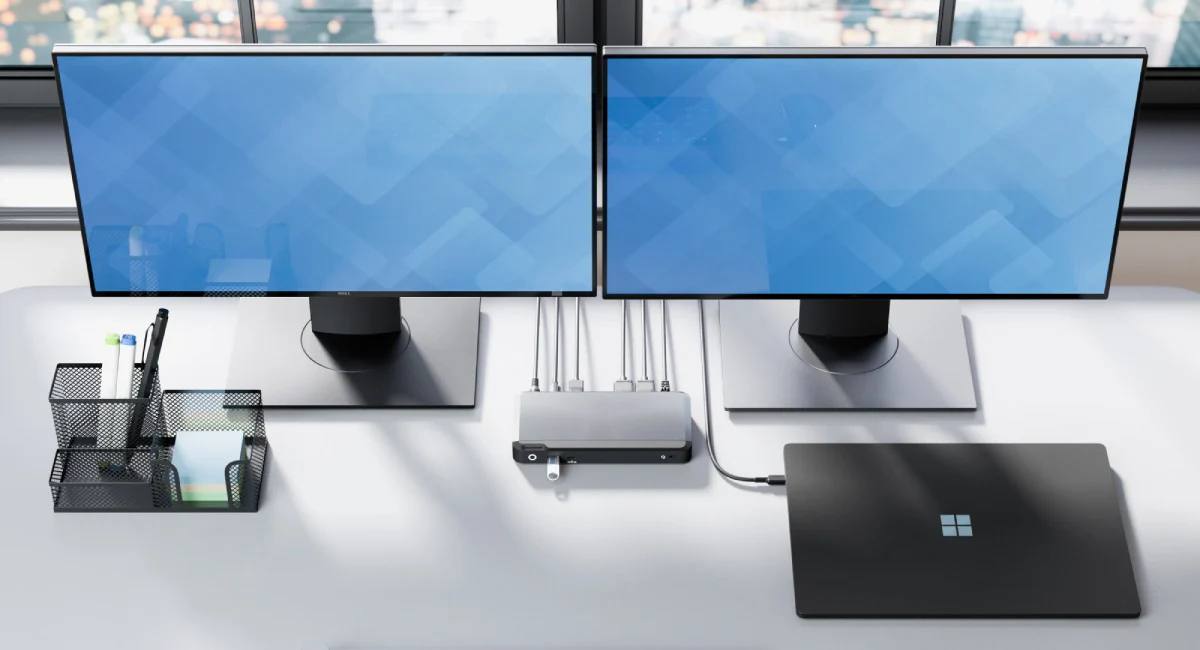
For most Nigerians, a single adapter isn’t enough. An HDMI hub (or USB-C Multi-port Adapter) is the ultimate tool. These devices expand one USB-C port into an HDMI port, multiple USB-A ports (for flash drives), and sometimes an SD card slot. This is the most popular search for professionals at Kara because it solves all connectivity issues at once.
Bridging the Gap: HDMI to VGA and Legacy Connections
In many Nigerian offices, you might still encounter the “blue-headed” VGA cable. If you have a modern laptop, an HDMI-to-VGA converter is non-negotiable.
- Note: VGA only carries video, not sound. If you use a basic HDMI-to-VGA adapter, the sound will still come out of your laptop speakers unless you get a converter with a built-in 3.5mm audio jack.
For even older equipment, you might look for an HDMI-to-AV cable or an HDMI-to-AV converter. These allow you to connect a modern laptop to an old “box” TV (CRT) using the red, white, and yellow RCA plugs.
Long-Distance Solutions: HDMI Extenders and 10-Meter Cables
Large venues such as churches, event halls, and large corporate offices in Nigeria often need to transmit video signals over long distances.
The HDMI Long Cable Strategy
A standard HDMI cable starts to lose signal quality after 5 meters. If you need a 10-meter HDMI cable or even longer, ensure you buy an “Active” cable or an HDMI 4K cable with high-quality shielding to avoid flickering.
HDMI Over CAT6 Extender
When the distance exceeds 20 or 30 meters, a cable isn’t enough. This is where an HDMI extender or HDMI over Cat6 extender comes in. It uses a standard Internet (Ethernet) cable to carry the HDMI signal up to 60 or 100 meters without quality loss.
Cutting the Cord: HDMI Wireless Transmitter and Receiver
Cables can be messy. In 2026, the HDMI wireless transmitter and receiver (also known as an HDMI wireless extender) will become the gold standard for executive boardrooms.
- How it works: You plug the HDMI wireless transmitter into your laptop (using an HDMI to USB converter if necessary) and the HDMI receiver and transmitter unit into the TV.
- The Benefit: No more long cords trailing across the floor. You can sit anywhere in the room and beam your screen to the HDMI monitor.
Advanced Video Tools: Splitters, Switches, and Capture Cards
For specialized setups, standard cables aren’t enough.
HDMI Splitter Price in Nigeria and Usage
An HDMI splitter takes one signal and sends it to multiple screens.
- HDMI splitter 1 in 2 out: Great for a shop showing the same video on two TVs.
- HDMI splitter 1 in 4 out or HDMI splitter 8 port: Essential for sports bars or viewing centers in Nigeria.
HDMI Switch vs. HDMI Splitter
An HDMI switch is the opposite. It allows you to plug multiple devices (Laptop, PS5, Decoder) into one TV port and switch between them with a remote.
HDMI Video Capture and Capture Cards
With the rise of content creation in Lagos, the HDMI video capture device (or HDMI capture card) has become a best-seller. This allows you to “input” an HDMI signal into your laptop to record gameplay or use a professional camera as a webcam for high-quality Zoom calls.
Connecting Mobile Devices: HDMI Adapter for Phone to TV
Often, you don’t even want to bring your laptop. An HDMI adapter for phone-to-TV allows you to project your smartphone screen directly to a TV.
- For Android: Look for an HDMI to USB-C HDMI USB connector.
- For iPhone: You’ll need a Lightning or USB-C to HDMI Digital AV Adapter.
Financial Considerations: HDMI Cable Price in Nigeria
When shopping at Kara, you’ll notice a wide range in HDMI cable prices.
If your office display doesn’t natively support wireless protocols, you may need a physical bridge. Check out our review of the Top 5 USB-C to HDMI Dongles for Lagos Professionals to ensure your wired backup is as reliable as your wireless setup
- Budget Cords: Basic HDMI cord (1.5m) starts around ₦3,500.
- Premium/Long Cords: An HDMI 2.1 cable or HDMI 4k cable (10m+) can range from ₦15,000 to ₦45,000 depending on the brand (e.g., Ugreen, Baseus).
- Specialized Converters: An HDMI to SDI converter (used in professional broadcasting) or an HDMI audio extractor (to send sound to a dedicated sound system) will sit at a higher price point due to the internal chips required.
Step-by-Step: How to Connect Your Laptop When There’s No Port
- Identify your port: Does your laptop have a USB-C port? Look for a small “D” (DisplayPort) icon or a lightning bolt.
- Select your adapter: Buy an HDMI to USB converter or a multi-port HDMI hub from Kara.com.ng.
- Connect the Cable: Plug a high-quality HDMI cable from the laptop to the TV into the adapter.
- Software Setup: Press Windows + P on your keyboard and select “Duplicate” or “Extend.”
- Troubleshooting: If no image appears, check the HDMI connector for dust or try a different HDMI port on the laptop (if available).
Summary Checklist for Nigerian Laptop Buyers
| Requirement | Best Tool to Buy |
|---|---|
| New MacBook/Slim Laptop | HDMI to USB C or USB-C Hub |
| Old Office Projector | HDMI to VGA converter |
| Long distance (Churches/Halls) | HDMI over Cat6 extender |
| Sports Bar/Multiple TVs | HDMI splitter 1 in 4 out |
| Streaming/Recording | HDMI capture card |
| Connecting Phone to TV | HDMI adapter for phone to TV |
Final Verdict: Don’t Let Ports Limit Your Laptop Potential
The “No HDMI” era isn’t a problem if you have the right tools. Whether you need a simple mini HDMI-to-HDMI cable for your camera, an HDMI-to-USB converter for your TV, or a professional HDMI audio extractor, Kara has you covered.
Ready to get connected? * Shop HDMI Cables and Adapters on Kara
- WhatsApp us for bulk orders: +2349091909269