With the iPhone 17 Pro Max running iOS 26, storage management has become more automated, but the “WhatsApp Effect” still plagues many Nigerian users. Here is how to take control.
Table of Contents
The “Nigeria Special”: Clearing WhatsApp Media Cache
WhatsApp is often the #1 storage consumer for Nigerians due to high-volume media shared in groups. Unlike Android, iOS doesn’t have a “Clear Cache” button, so you must use the internal manager:
- Open WhatsApp and go to Settings.
- Tap Storage and Data > Manage Storage.
- Review and Delete: You will see a section for “Larger than 5 MB.” Tap this to see high-res videos taking up space.
- Chat-Specific Cleaning: Scroll down to see which specific groups or contacts are eating your storage.
- Pro Tip: Turn off “Save to Photos” in Settings > Chats to prevent every “Good Morning” image from cluttering your main Gallery and iCloud.
iOS 26 vs. iOS 25: What’s New in Storage?
The latest iOS 26 update (link to your relevant article) introduces “Apple Intelligence Content Pruning.” * iOS 25: Used basic “Offload Unused Apps” logic.
- iOS 26: Uses local AI to identify duplicate content and “Burst Photo” clutter more aggressively. It also introduces “Smart Caching” for streaming apps like Netflix and YouTube, which automatically purges downloaded videos you’ve already finished watching to keep your 512GB lean.
Comparison: iCloud+ vs. Google One vs. Physical SSD
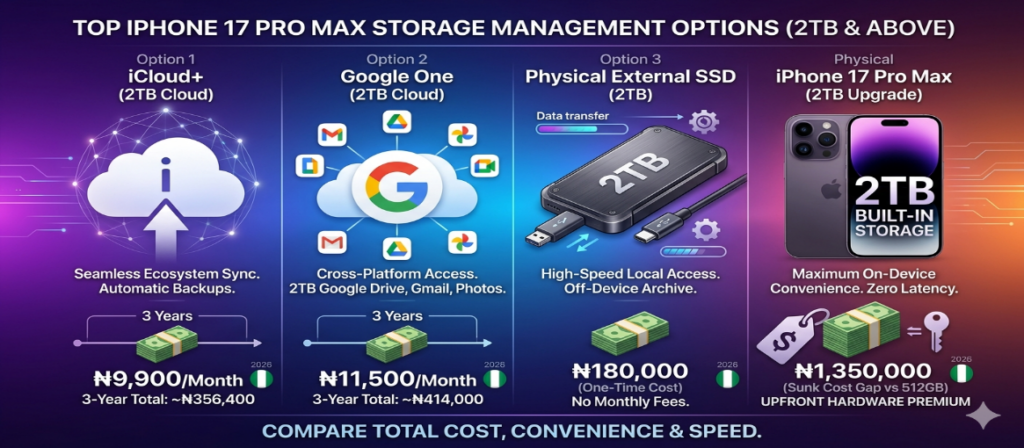
If you choose the 512GB iPhone 17 Pro Max, you need a place for your “overflow” data. Here is how the costs stack up in the Nigerian market for 2TB of extra space:
| Storage Type | Monthly Cost (NGN) | 3-Year Total Cost | Pros/Cons |
|---|---|---|---|
| iCloud+ (2TB) | ₦9,900 | ~₦356,400 | Best for: Seamless backup, device syncing, and “Hide My Email.” |
| Google One (2TB) | ₦11,500 | ~₦414,000 | Best for: Heavy Google Drive/Gmail users and cross-platform (Android/iOS). |
| Physical SSD (2TB) | ₦0 (One-time ₦180k) | ₦180,000 | Best for: Filmmakers. (Requires manual plugging in; no auto-cloud sync). |
| Physical iPhone Upgrade | N/A | ₦1,350,000 | The “Built-in” 2TB cost. High convenience but 4x the price of cloud. |
Storage Management & Duplicate Cleanup
To keep your iPhone 17 Pro Max running at peak speed, follow these three daily habits:
1. AI Duplicate Management for iPhone Storage
iOS 26 now groups “Near-Duplicates”—photos that are almost identical but have slight differences in lighting.
- Go to Photos > Albums > Utilities > Duplicates.
- Tap Merge to keep the highest quality version and delete the rest.
2. Offloading Inactive Apps
Don’t delete apps you might need later. Use Settings > General > iPhone Storage > Offload Unused Apps. This keeps your documents and data but removes the massive app file itself. This is vital if you have large games like Genshin Impact or Call of Duty that you only play occasionally.
3. Optimizing High-Resolution Content
The iPhone 17 Pro Max records in HEIF/HEVC formats by default. Never change this to “Most Compatible” in Settings unless necessary, as it can double the file size of every photo you take.

The Bottom Line: Why 512GB + Cloud is the Financial Winner
By purchasing the 512GB variant from Kara.com.ng, you avoid the immediate ₦1.35 million premium of the 2TB model.
- Year 1: Use your 512GB freely.
- Year 2: When storage nears capacity, subscribe to iCloud+.
- Result: Even after paying for 3 years of iCloud, you have still saved nearly ₦1,000,000 compared to the upfront cost of the 2TB hardware—money that is better kept in your pocket or invested.